
Conversational AI-EDA, inside KiCad.
Describe what you need in plain language. Circute.AI turns it into schematics, auto-routed layouts and Gerber exports in minutes, and checks every change before you keep it.
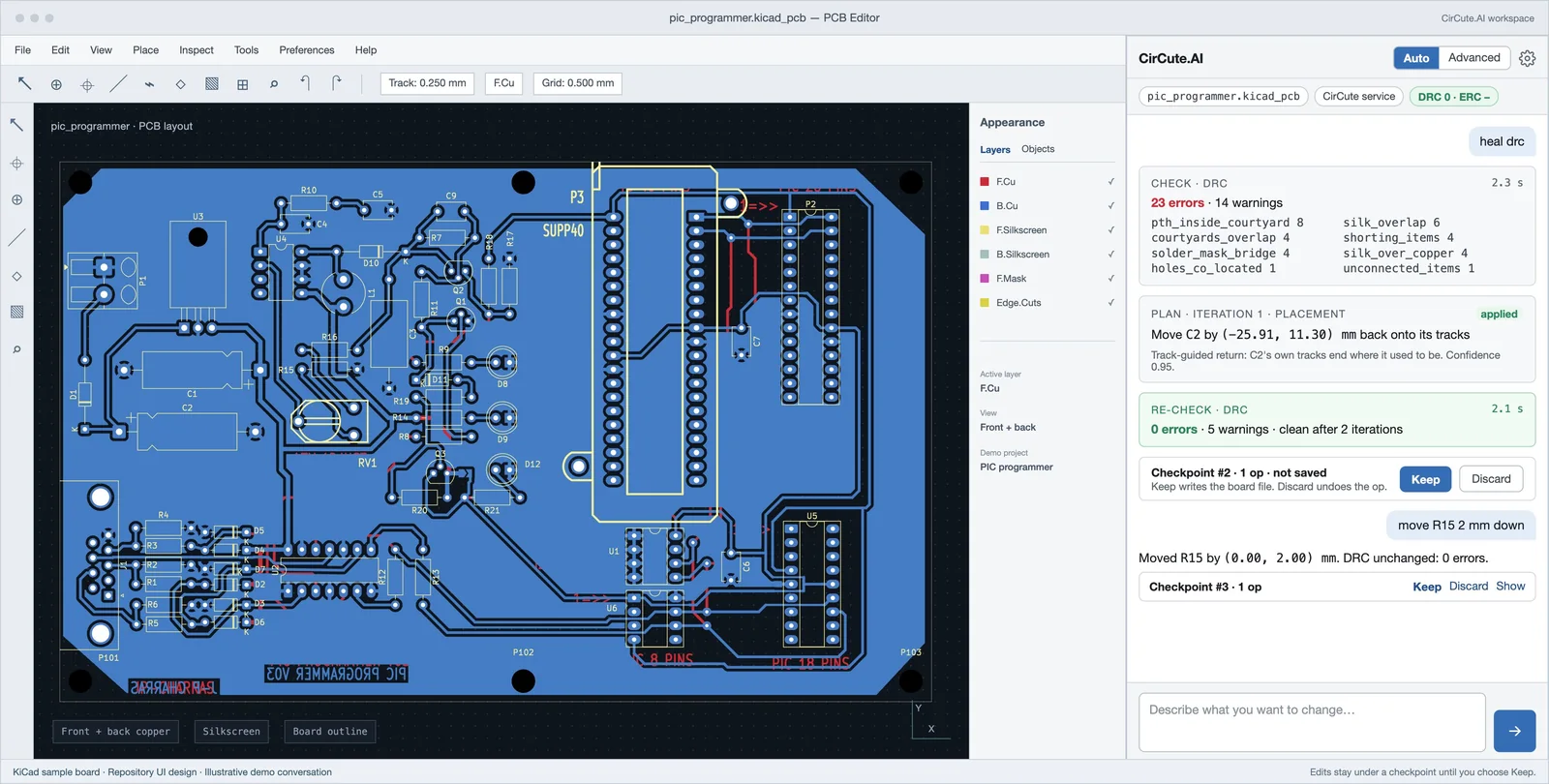
Ask, check, keep.
Ask in plain language.
Type or speak the change, in any of more than 20 languages. Choose Auto to apply the plan directly, or Advanced to approve each step.
Check every change.
Every edit is followed by a design-rule check. Circute.AI heals the violations it can and hands you the rest, each with a link to the item.
Keep or discard.
Each change sits under a checkpoint. Keep writes the board file; Discard undoes it.
From a sentence to a checked change.
Ask
Type or say what you want in the panel inside the editor: a new circuit, a value, a footprint swap, a route, a placement, or simply “heal”.
Plan
Circute.AI answers with a plan card: what it will do, on which parts, and what it will check afterwards.
Change
It edits the live board under a checkpoint, re-runs the design-rule check on a shadow copy and puts the result on the card.
Keep or discard
Your files are not written until you choose Keep. Discard replays the inverse of every edit.
What it does today.
Circute.AI is a KiCad plugin, so the output is your own project in standard files: schematics, layouts and Gerbers. It is in beta, and its capabilities, part libraries and access grow with each release.
- Schematic edits: values, footprints, power flags and no-connects, applied to a shadow of the schematic and copied back on Keep.
- Placement and routing: auto-route a layout, or move, rotate, flip and place parts, with the tracks following the part.
- Self-healing DRC and ERC: overlaps, silk over copper, copper shorts and unused-pin errors fixed automatically; the rest reported to you.
- Design Rule Guard: a live violation count while you work, with one click to heal what changed.
- Footprint swaps that carry position, side, orientation, reference, value and every pad net across.
- Every change under a checkpoint with Keep and Discard, and a per-project conversation that survives closing the window.
- Gerber exports from the finished layout, ready for your fabricator.
Drawn the way a reviewer expects.
Behind the chat is a schematic doctrine: how a page is composed, where fields sit, how nets are named across pages, what a finished page owes before sign-off. The same rules gate SPATICS’s own design work, so a Circute.AI draft reads like one of ours.
Who it is for.
- Aerospace and UAV teams that need boards faster than a full design cycle allows.
- Engineers who want a first draft to critique rather than a blank sheet.
- Programmes that must keep design files open, auditable and in India.
- SPATICS design and schematics clients, where it speeds up our own work.
Request an invite.
Invitations go out in small batches so every user gets engineering attention. Tell us what you would build and we will let you know when a seat opens.